

Deposit at GG777: Methods, Limits & Payment Checks
A Deposit at GG777 is simple once you know which payment route fits the amount you want to add. GCash, PayMaya, Online Payment, USDT, GrabPay, and GoTyme are available, but their limits and payment flow are not identical. Checking those details first saves far more time than fixing a mismatched transaction afterward.
GG777 Deposit Options at a Glance
Inside GG777 cashier, Deposit options are arranged by payment method rather than forcing every transaction through the same route. That matters because someone sending ₱500 through GCash has a very different decision to make from someone funding a larger balance through USDT or Online Payment.
The available Deposit choices include:
- GCash: Multiple individual channels, including GCash-01 through GCash-05.
- PayMaya: An e-wallet route for users who already keep funds in Maya/PayMaya.
- Online Payment: Intended for bank-based payments.
- USDT: A cryptocurrency option for users already comfortable sending digital assets.
- GrabPay: Another wallet-based choice.
- GoTyme: Useful for users who already manage their money through GoTyme.
There is no reason to choose a method simply because it appears first. Start with three practical questions: Is your amount within the current limit, do you already have funds available there, and can you verify the payment details before sending?
That small comparison makes Deposit much less mechanical. A familiar wallet with an appropriate limit is usually easier than moving money between accounts just to use a different cashier option.
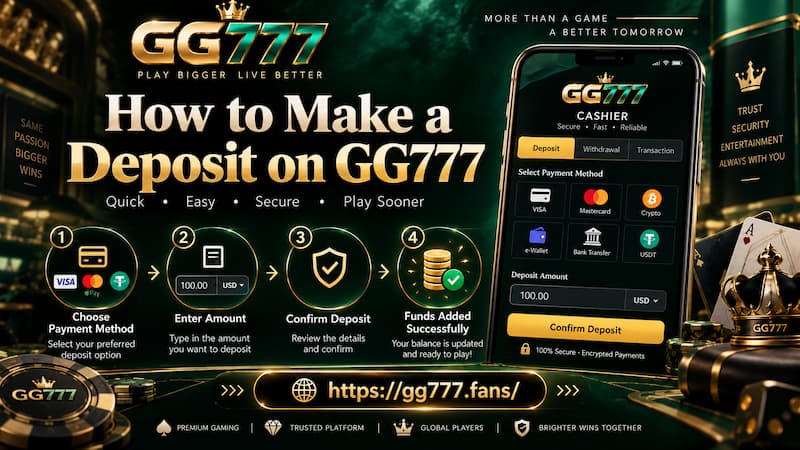
How to Make a Deposit on GG777
The actual Deposit process is short, but there are several points where checking before clicking can prevent a failed or delayed transaction.
How to Make a Deposit on GG777
Choose a Payment Method and Channel
After logging in, open Deposit and choose the payment method you intend to use. With a method such as GCash, the next decision is the specific channel.
A normal flow looks like this:
- Log in to your account.
- Open Deposit from the account menu.
- Select GCash, PayMaya, Online Payment, USDT, GrabPay, or GoTyme.
- Choose an available channel when more than one is shown.
- Check its minimum and maximum Deposit amount.
- Enter the amount you intend to fund.
- Review the payment figures before selecting Pay Immediately.
- Complete the instructions supplied for the chosen payment route.
The important part happens before step seven. Do not treat every button under the same payment method as interchangeable.
Check the Amount Before Paying
The cashier gives you several figures around the Deposit field, including:
- You need to pay
- Handling fee
- Actual Deposit Amount
Read them together.
For example, entering ₱5,000 should not become a habit of immediately pressing the payment button simply because ₱5,000 falls within the advertised limit. First look at the handling fee and confirm the actual amount being credited.
The number typed into the Deposit box is only the starting point. The amount shown for the final transaction is the figure worth checking before money leaves your wallet or bank account.
For the GCash route currently displayed, the handling fee is shown as 0, making the calculation straightforward.
GCash Deposit Channels and Limits
GCash deserves its own section because GG777 does not treat it as one universal Deposit route. Several GCash channels can be available at the same time, and their minimum amounts can differ.

GCash Deposit Channels and Limits
The current cashier displays these limits:
| GCash Channel | Single Deposit Limit |
| GCash-01 | ₱100 – ₱50,000 |
| GCash-02 | ₱100 – ₱50,000 |
| GCash-03 | ₱100 – ₱50,000 |
| GCash-04 | ₱100 – ₱50,000 |
| GCash-05 | ₱20 – ₱50,000 |
That difference becomes useful with very small transactions.
Suppose you want to Deposit ₱50. GCash-01 is not suitable because its minimum is ₱100. The same applies to GCash-02, GCash-03, and GCash-04. GCash-05, however, currently accepts a minimum of ₱20, so ₱50 falls inside its displayed range.
For a ₱10,000 Deposit, all five listed channels fit the amount according to the limits shown. In that situation, the minimum is no longer the deciding factor. You can simply use an active channel and confirm its details before proceeding.
This is a small distinction, but it prevents one of the easiest mistakes to make: Seeing “GCash” and assuming every GCash option has exactly the same rules.
E-Wallet, Online Payment or USDT
The best Deposit method is usually the one that matches both your funding source and your familiarity with the payment process.
E-Wallet Deposits
GCash, PayMaya, and GrabPay make the most sense when your funds are already sitting in the corresponding wallet.
Imagine you have ₱3,000 ready in GCash but almost nothing in PayMaya. Moving the money from one service to another just so you can choose a different Deposit button adds another transaction, another balance to check, and another place where a delay can occur.
If GCash accepts the amount and the channel details are clear, keeping the payment path short is more practical.
The same thinking applies to GoTyme. Availability alone does not make it the automatic choice. Familiarity with the account and immediate access to your funds matter more.
Online Payment
Online Payment is the more natural route when the money is coming directly from a supported local bank rather than an e-wallet.
Pay attention to the bank selection before confirming. A Deposit through Online Payment can involve more than entering an amount, so check that the bank and payment instructions match the account you intend to use.
This becomes especially important if you regularly use several banking apps. Selecting one bank and accidentally trying to complete the transfer from another can turn an otherwise simple transaction into an unnecessary support issue.
USDT Deposits
USDT belongs in a different category.
It can be useful for someone who already holds USDT and understands wallet addresses, networks, and cryptocurrency transfers. It should not be chosen merely because “crypto” sounds faster or more flexible.
Before sending USDT, check every transfer detail presented for that Deposit. Crypto transactions generally do not have the same simple reversal process people expect from familiar banking or wallet payments.
A user who already sends USDT regularly may find the process comfortable. Someone making a first-ever crypto transfer just to fund a gaming account is taking on extra complexity for little practical benefit.
Deposit Limits and Fees
Limits are not decorative numbers. They determine whether the transaction fits the selected payment route.
Before paying, check:
- The minimum Deposit for the active channel.
- The maximum Deposit allowed in one transaction.
- Whether another channel under the same payment method has different limits.
- The displayed Handling fee.
- The final Actual Deposit Amount.
The current GCash screen shows a maximum single Deposit of ₱50,000 across GCash-01 to GCash-05. The minimum is where the difference appears: ₱100 for the first four channels and ₱20 for GCash-05.
Consider someone wanting to add ₱60,000. Splitting the amount into multiple payments should not be an automatic reaction to seeing a ₱50,000 single-transaction limit. First check the current cashier rules and whether another suitable Deposit method is intended for a larger amount.
Limits can also change as payment channels are adjusted. The figure displayed beside the active channel at the moment you Deposit is more useful than an old screenshot, saved message, or limit remembered from a previous transaction.
Checks Before Confirming a Deposit
A good Deposit routine takes less than a minute.
Before selecting Pay Immediately, run through these checks:
- Confirm that you selected the intended payment method.
- Check the exact channel, especially with GCash.
- Make sure your Deposit falls between the displayed minimum and maximum.
- Read the handling fee instead of assuming it will always be zero.
- Compare the amount you entered with Actual Deposit Amount.
- For Online Payment, check the selected bank.
- For USDT, verify the transfer information carefully before sending.
- Keep the transaction confirmation until the balance is credited.
The biggest advantage of this routine is not technical. It gives you a clean record of what happened.
If a ₱2,500 payment later needs checking, knowing the exact channel, payment time, reference number, and amount is much more useful than remembering only that you “used GCash earlier.”
When a Deposit Has Not Reached Your Balance
A completed payment and a credited GG777 balance are connected, but they are not the same stage of the process.
If funds leave your wallet and the balance does not update immediately, avoid making the same Deposit again just to see whether the second one works.
Start with the transaction itself.
Check the Payment Status
Open the wallet, bank, or payment service you used and verify whether the transaction is:
- Completed
- Pending
- Failed
- Reversed
If no money left the account and the payment failed, the problem is different from a transaction marked completed.
Check the Transaction Center
Next, open the Transaction Center in GG777 and look for the Deposit record.
Match the important details:
- Amount
- Deposit method
- Transaction time
- Status
- Reference or transaction number
If the payment provider says Completed but the Deposit is still not credited, keep screenshots or transaction records before contacting support.
Deposit troubleshooting should stay separate from withdrawal issues because the two cashier flows use different account checks and transaction steps.